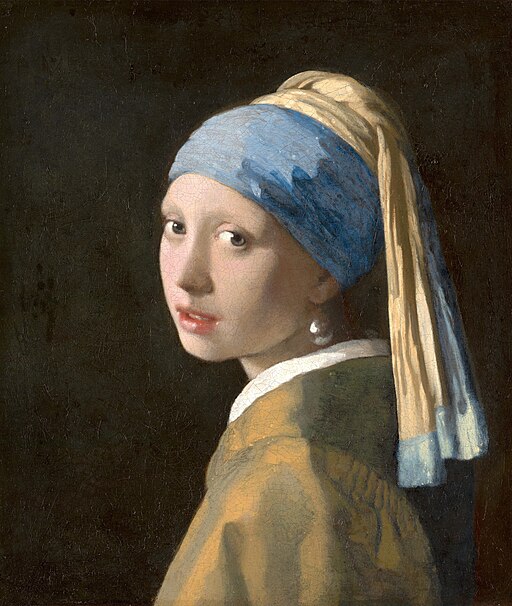
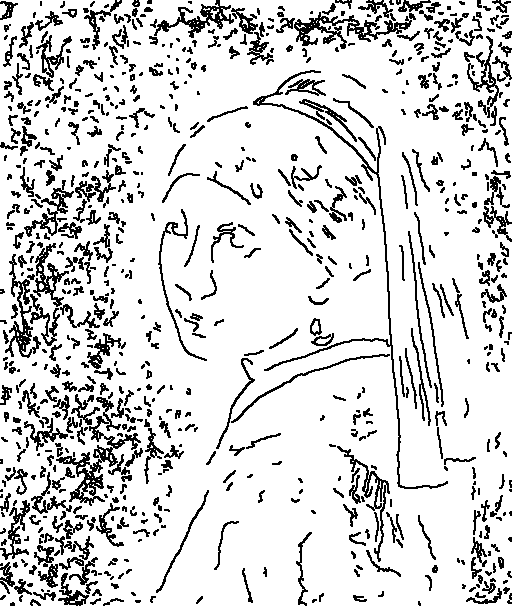
The trace image filter includes two steps. The first step generates the contour images. You will choose one contour image that you want to use for the next step. The second step generates the Trace ASCII Art. The following guide describes the process.
📖 Guide 1: Draw Image Contour
1️⃣ cd to src/edge_trace.
2️⃣ Execute contour.py.
Example:
python contour.py --image_path ../../resource/imgs/girl_with_pearl_earring.jpg --canny1_min 0 --canny1_max 270 --canny1_step 20 --canny2_min 0 --canny2_max 270 --canny2_step 20 --dilate_iter 1 --erode_iter 0 --gb_sigmaX 0 --gb_size 5 --contrast_factor 16 --contrast_window_size 8Another Example:
python contour.py --image_path ../../resource/imgs/tsunami.jpg --canny1_min 0 --canny1_max 270 --canny1_step 20 --canny2_min 0 --canny2_max 270 --canny2_step 20 --dilate_iter 1 --erode_iter 0 --gb_sigmaX 0 --gb_size 5 --contrast_factor 4 --contrast_window_size 8Parameters
| argument | help |
|---|---|
| —image_path | The path of the image. |
| —save_folder | The folder where the contour images will be saved to. |
| —canny1_min | The minimum value of threshold1 for Canny. |
| —canny1_max | The maximum value of threshold1 for Canny. |
| —canny1_step | The step value of threshold1 for Canny. |
| —canny2_min | The minimum value of threshold2 for Canny. |
| —canny2_max | The maximum value of threshold2 for Canny. |
| —canny2_step | The step value of threshold2 for Canny. |
| —contrast_factor | The contrast factor based on the original image. |
| —contrast_window_size | The kernel size of contrast filter. |
| —gb_size | The kernel size of GaussianBlur. |
| —gb_sigmaX | The standard deviation of GaussianBlur kernel in the horizontal direction. |
| —kernel_size | The kernel size of contour function. |
| —dilate_iter | The number of iterations of dilate. |
| —erode_iter | The number of iterations of erode. |
| —invert_color | If included, paint the edges white and the background black. |
An example of contour image:
📖 Guide 2: Edge Trace ASCII Art
1️⃣ cd to src/edge_trace.
2️⃣ Execute edge_trace.py.
Example:
python edge_trace.py --image_path ./contour/contour_180_260.png --resize_factor 4 --chars file --font C:/Windows/Fonts/consolab.ttf --char_bound_width 13 --char_bound_height 22 --match_method slowJapanese Hiragana:
python edge_trace.py --image_path ./contour/contour_240_200.png --resize_factor 4 --chars file --char_bound_height 24 --char_bound_width 22 --font C:/Windows/Fonts/msgothic.ttc --font_size 24 --chars_file_path ../../resource/char_files/chars_file_hiragana.txt --match_method vector --approx_ratio 0.5 --vector_top_k 5 --invert_colorAn Example using Palette file, Check out the palette tutorial if you would like to make your own palette:
python edge_trace.py --image_path ./contour/contour_180_260.png --resize_factor 4 --palette_path ../../resource/palette_files/palette_chars.json --match_method slowIf you want to preserve character anti-aliasing:
python edge_trace.py --image_path ./contour/contour_180_260.png --resize_factor 4 --palette_path ../../resource/palette_files/palette_chars.json --match_method slow --antialiasingParameters
| argument | help |
|---|---|
| —image_path | The path of the image. |
| —save_path | The directory where the result image will be saved to. |
| —resize_method | The image resize method. Check below for available options. |
| —resize_factor | The resize factor of the new image. |
| —font | The font to be used to render the image. |
| —chars | The characters you want to use for rendering the image. Check below for available options. |
| —chars_file_path | The text file of your characters. |
| —font_size | The font size. |
| —char_bound_width | The width of one character. We assume each character has the same size. |
| —char_bound_height | The height of one character. We assume each character has the same size. |
| —invert_color | If included, invert the color of the result image. |
| —max_workers | The maximum number of multithread workers. |
| —match_method | The algorithm for template (character) matching. Check below for available options. |
| —approx_ratio | Only used if the matching method is ‘vector’. Each smaller image will be resized by this value before comparison. |
| —vector_top_k | Only used if the matching method is ‘vector’. Only compare the smaller image to the k best candidates. |
| —palette_path | Use a palette. Only the first template will be used. The values in template can be overridden with explicit arguments. |
| —color_option | The option to color the image. Check below for available options. |
| —original_image_path | REQUIRED if you are doing color_option=original. |
| —save_ascii | If included, the characters will be saved to a file. |
| —save_ascii_path | The path to save the characters. Check out the ‘ascii_output’ folder for the results. |
| —antialiasing | If included, retain anti-aliasing of the characters. |
| —pad_width | Add padding around every character vertically. |
| —pad_height | Add padding around every character horizontally. |
| —flow_match_method | The algorithm for non-fixed width template (character) matching. Check below for available options. |
| —binary_threshold | The threshold value for converting a grayscale image to binary. This is only used when flow_match_method=fast. |
| —reference_num | Only used if the palette file is non-fixed width. Takes previous character as reference to replace ‘filler’ characters. A filler is a 1px * the row height empty character used to filling in the gaps that cannot be matched with the given characters in palette. |
| —max_num_fill_item | Only used if the palette file is non-fixed width. This value is the maximum number of characters used to fill any gap. |
| —filler_lambda | Only used if the palette file is non-fixed width. Larger lambda indicates more emphasis on the gap filling with palette characters and less emphasis on the similarity between filling choices and the references. |
| —char_weight_sum_factor | Only used if the palette file is non-fixed width. This factor indicates the importance of character weights when deciding the next character. |
| —curr_layer_weight_factor | Only used if the palette file is non-fixed width. This factor indicates the importance of a particular layer when deciding the next character. By default, we assume that the gradient image in higher index have more importance. |
| —offset_mse_factor | Only used if the palette file is non-fixed width. This factor indicates the importance of mean squared error when deciding the next character. Higher MSE means less likely to be chosen. |
| —coherence_score_factor | Only used if the palette file is non-fixed width. This factor indicates the importance of staying in the same level when deciding the next character. |
resize_method
| code | help |
|---|---|
| nearest neighbor | Resize image with nearest neighbor algorithm. |
| bilinear | Resize image with bilinear algorithm. |
chars
| code | help |
|---|---|
| ascii | Use all 128 standard ASCII characters as rendering characters. |
| file | Read characters from file trace/chars_file.txt. New line character will be excluded. |
match_method
| code | help |
|---|---|
| slow | The slowest matching algorithm with the best matching quality. The templates are grayscale. |
| optimized | Almost twice as fast as slow. The templates are binary. The resulting image will look bold compared to slow method. |
| fast | Almost twice as fast as optimized. Utilizes XOR comparison. The resulting image is very similar to optimized method. |
| vector | Almost ten times as fast as slow. Vectorize all smaller images and compare the flattened array. The resulting image is much bolder. |
color_option
| code | help |
|---|---|
| original | Color the ASCII art with the (resized) original image’s color. |
flow_match_method
| code | help |
|---|---|
| slow | The slowest matching algorithm with the best matching quality. The templates are grayscale. |
| fast | Both the image and templates will be converted to binary. Utilizes XOR comparison. |
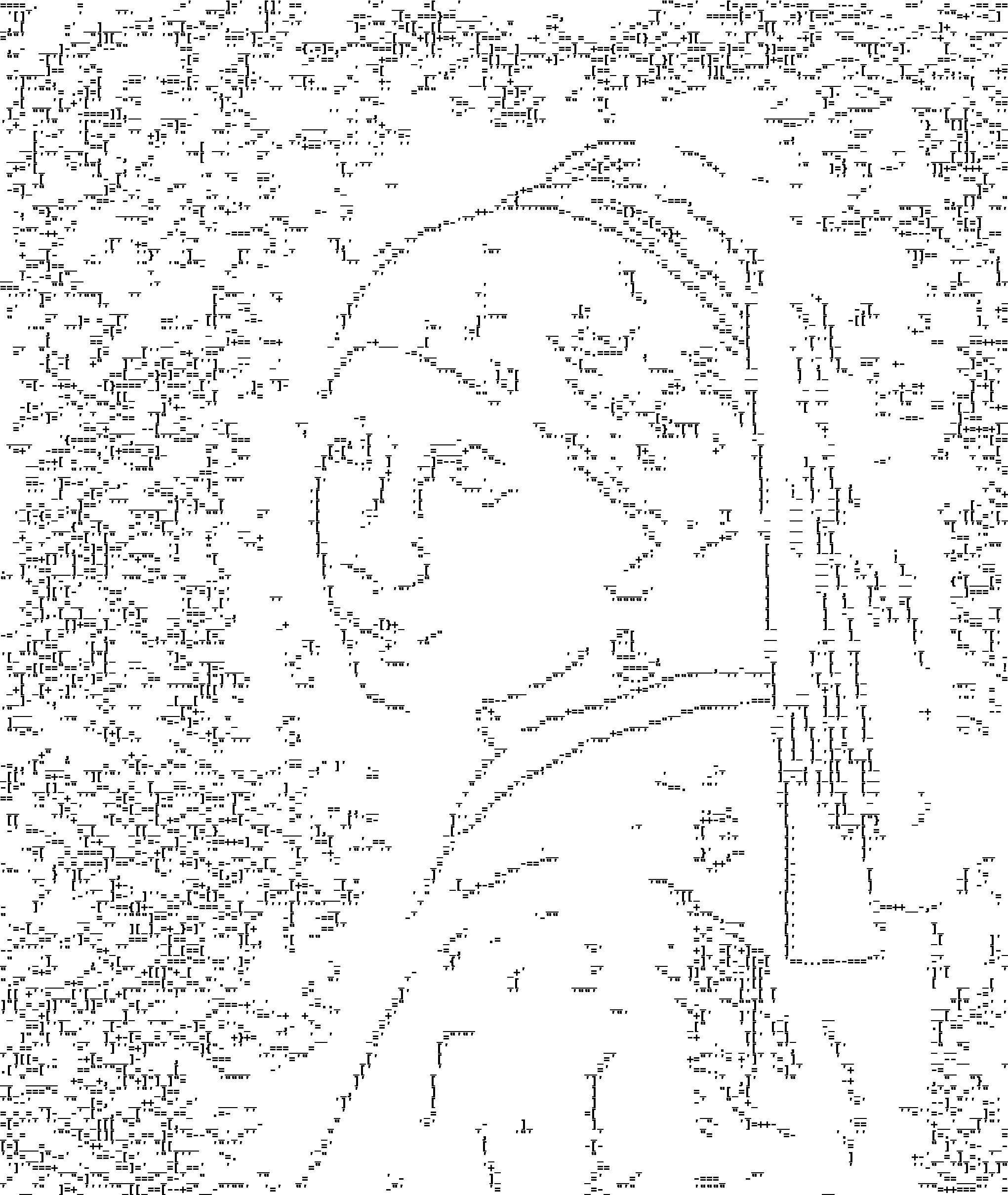
An example of ascii art image:
📕 Extra Guide: Joined-Trace ASCII Art
1️⃣ cd to src/edge_trace.
2️⃣ Execute joined_trace.py.
Example:
python joined_trace.py ^--image_path ../../resource/imgs/girl_with_pearl_earring.jpg ^--canny1 180 ^--canny2 260 ^--gb_size 5 ^--gb_sigmaX 0 ^--kernel_size 2 ^--dilate_iter 1 ^--erode_iter 0 ^--contrast_factor 16 ^--contrast_window_size 8 ^--resize_factor 4 ^--resize_method nearest_neighbor ^--match_method slow ^--palette_path ../../resource/palette_files/palette_chars.jsonParameters
| argument | help |
|---|---|
| —image_path | The path of the image. |
| —canny1 | The value of threshold1 for Canny. |
| —canny2 | The value of threshold2 for Canny. |
| —gb_size | The kernel size of GaussianBlur. |
| —gb_sigmaX | The standard deviation of GaussianBlur kernel in the horizontal direction. |
| —kernel_size | The kernel size of contour function. |
| —dilate_iter | The number of iterations of dilate. |
| —erode_iter | The number of iterations of erode. |
| —contrast_factor | The contrast factor based on the original image. |
| —contrast_window_size | The kernel size of contrast filter. |
| —save_path | The directory where the result image will be saved to. |
| —resize_method | The image resize method. Check below for available options. |
| —resize_factor | The resize factor of the new image. |
| —font | The font to be used to render the image. |
| —chars | The characters you want to use for rendering the image. Check below for available options. |
| —chars_file_path | The text file of your characters. |
| —font_size | The font size. |
| —char_bound_width | The width of one character. We assume each character has the same size. |
| —char_bound_height | The height of one character. We assume each character has the same size. |
| —invert_color | If included, invert the color of the result image. |
| —max_workers | The maximum number of multithread workers. |
| —match_method | The algorithm for template (character) matching. Check below for available options. |
| —approx_ratio | Only used if the matching method is ‘vector’. Each smaller image will be resized by this value before comparison. |
| —vector_top_k | Only used if the matching method is ‘vector’. Only compare the smaller image to the k best candidates. |
| —palette_path | Use a palette. Only the first template will be used. The values in template can be overridden with explicit arguments. |
| —color_option | The option to color the image. Check below for available options. |
| —save_ascii | If included, the characters will be saved to a file. |
| —save_ascii_path | The path to save the characters. Check out the ‘ascii_output’ folder for the results. |
| —antialiasing | If included, retain anti-aliasing of the characters. |
| —flow_match_method | The algorithm for non-fixed width template (character) matching. Check below for available options. |
| —binary_threshold | The threshold value for converting a grayscale image to binary. This is only used when flow_match_method=fast. |
| —reference_num | Only used if the palette file is non-fixed width. Takes previous character as reference to replace ‘filler’ characters. A filler is a 1px * the row height empty character used to filling in the gaps that cannot be matched with the given characters in palette. |
| —max_num_fill_item | Only used if the palette file is non-fixed width. This value is the maximum number of characters used to fill any gap. |
| —filler_lambda | Only used if the palette file is non-fixed width. Larger lambda indicates more emphasis on the gap filling with palette characters and less emphasis on the similarity between filling choices and the references. |
| —char_weight_sum_factor | Only used if the palette file is non-fixed width. This factor indicates the importance of character weights when deciding the next character. |
| —curr_layer_weight_factor | Only used if the palette file is non-fixed width. This factor indicates the importance of a particular layer when deciding the next character. By default, we assume that the gradient image in higher index have more importance. |
| —offset_mse_factor | Only used if the palette file is non-fixed width. This factor indicates the importance of mean squared error when deciding the next character. Higher MSE means less likely to be chosen. |
| —coherence_score_factor | Only used if the palette file is non-fixed width. This factor indicates the importance of staying in the same level when deciding the next character. |
resize_method
| code | help |
|---|---|
| nearest neighbor | Resize image with nearest neighbor algorithm. |
| bilinear | Resize image with bilinear algorithm. |
chars
| code | help |
|---|---|
| ascii | Use all 128 standard ASCII characters as rendering characters. |
| file | Read characters from file trace/chars_file.txt. New line character will be excluded. |
match_method
| code | help |
|---|---|
| slow | The slowest matching algorithm with the best matching quality. The templates are grayscale. |
| optimized | Almost twice as fast as slow. The templates are binary. The resulting image will look bold compared to slow method. |
| fast | Almost twice as fast as optimized. Utilizes XOR comparison. The resulting image is very similar to optimized method. |
| vector | Almost ten times as fast as slow. Vectorize all smaller images and compare the flattened array. The resulting image is much bolder. |
color_option
| code | help |
|---|---|
| original | Color the ASCII art with the (resized) original image’s color. |
flow_match_method
| code | help |
|---|---|
| slow | The slowest matching algorithm with the best matching quality. The templates are grayscale. |
| fast | Both the image and templates will be converted to binary. Utilizes XOR comparison. |
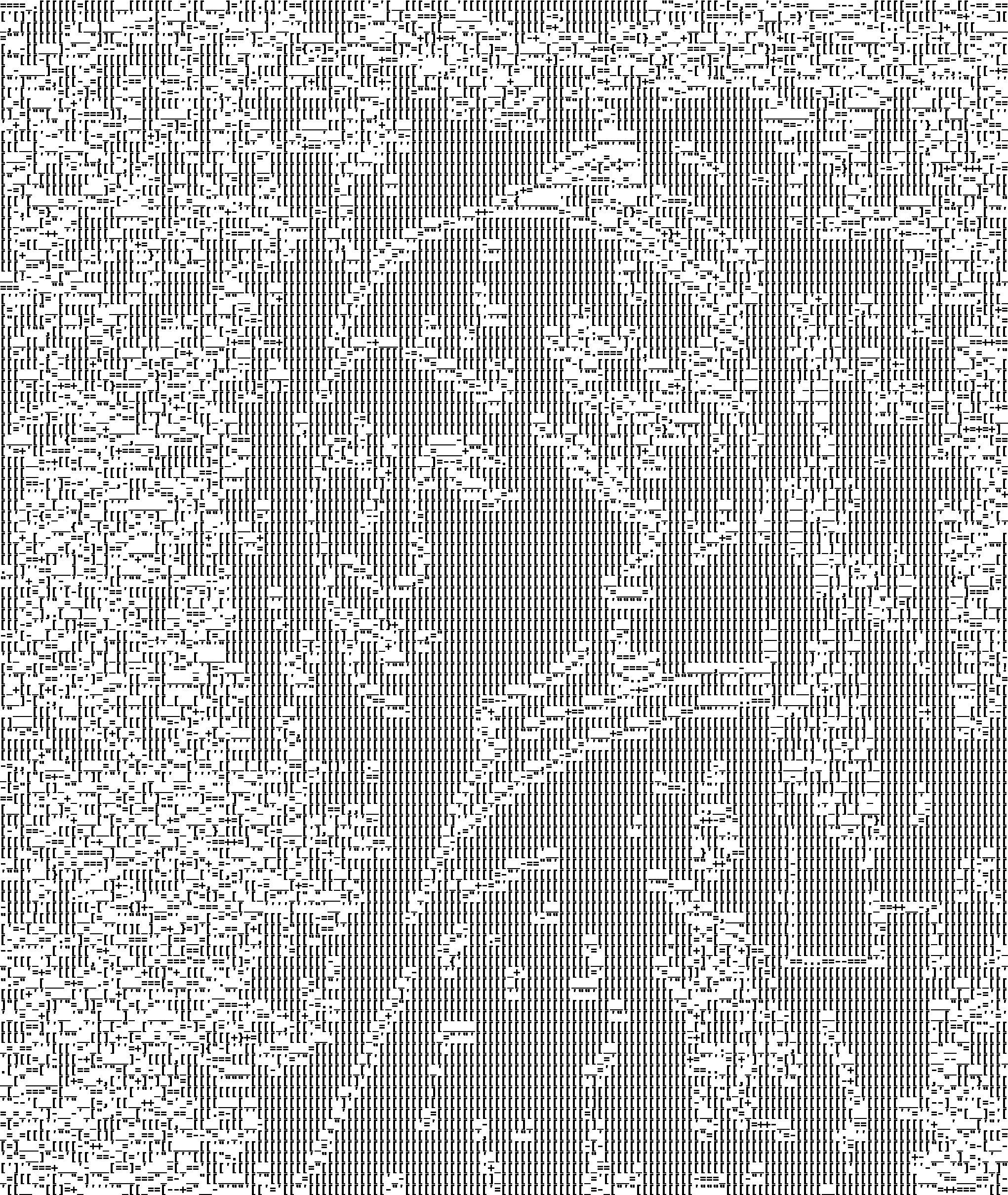
An example of ascii art image:
🖼️ Also check out the gallery for more examples!
⭐ Image Credit: girl_with_pearl_earring (Wikipedia)